
How to Work with Layers in Diagram
Diagram content can be split into several layers. Layers allow you to hide and show the chosen details.
Layers tab in the sidebar contains a toolbar with these buttons:
- Add Layer – adds a new layer
- Delete Layer – deletes the active (selected) layer
- Show/Hide Layer – shows the selected layer if it is hidden or hides it if it is displayed
- Enable/Disable Layer – elements of a disabled layer are visible but they cannot be selected or moved.
- Lock/Unlock Layer – elements of a locked layer are visible, can be selected and edited but they cannot be moved.
- Merge All Layers – merges all layers into a single layer
- Move Up Layer – moves up the selected layer
- Move Down Layer – moves down the selected layer
Ribbon - Diagram Tab / Layers Group
Layers Group offers actions for handling the layers in the active diagram. Each diagram can consist of several layers, which are rendered one by one. Each layer can contain elements. The layer can be hidden, locked or deleted. So you can manipulate many relative elements at once.
Add Layer - Adds a new layer into the active diagram.
Layers - Shows a list of layers of the active diagram. It allows you to activate another layer.
Hide Layer - Hides the active layer in the active diagram.
Delete Layer - Deletes the active layer in the active diagram.
Merge Layers - Merges all layers in the active diagram to a single layer.
Show All Layers - Makes visible all layers in the active diagram.
Context Menu
If you right-click on an item in the list of layers, the context menu will show up. It offers the following options:
- Rename
- Move Up
- Move Down
- Show/Hide
- Locked
- Enabled
- Delete
Working with Layers
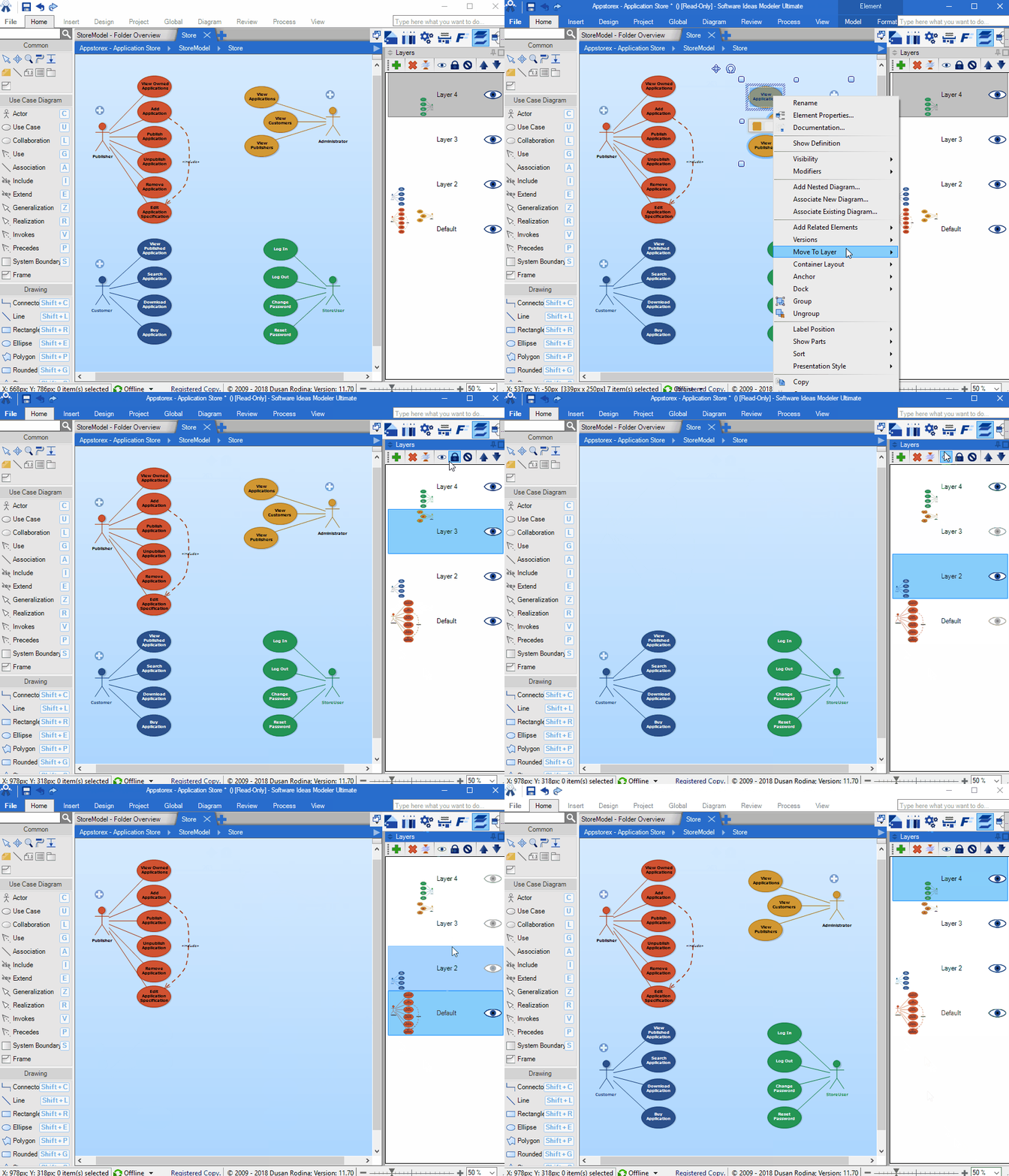
Add Elements into Layer
If you want to add elements into a layer, select a layer (click on its name in the list of layers). All elements, you add into a diagram will be placed in the active (selected) layer.
Move Elements into Another Layer
You can mouse selected elements to another layer. Right-click on a selected element to show the context menu, click on 'Move to Layer' menu item which opens a submenu with all layers in the current diagram. Clicking on a layer menu item moves the selected element(s) to the chosen layer.
Rename Layer
Each layer has its name. The first layer of a diagram (each diagram must have at least one layer) is named Default. Other layers are named Layer2, Layer3 ... etc. You may rename the layer to any name you want, the name which will better correspond its content. To rename the layer, select it and press F2. Alternatively, you may right-click on the layer item in the list and choose Rename from the shown context menu.
Paul deAnguera 3 April 2020 20:45:03
Layers and send to back
Dusan Rodina - softwareideas.net 4 April 2020 11:05:52
RE: Layers and send to back
Paul de Anguera 4 April 2020 23:47:08
RE: Layers and send to back
Ralph Reinhold 14 March 2012 7:25:47
Example of Layers in Use
Dusan Rodina - softwareideas.net 14 March 2012 14:47:42
RE: Example of Layers in Use
Ralph Reinhold 22 March 2012 10:45:35
RE: RE: Example of Layers in Use
Dusan Rodina - softwareideas.net 22 March 2012 14:53:29
RE: RE: RE: Example of Layers in Use
Ralph Reinhold 22 March 2012 15:34:04
RE: RE: RE: RE: Example of Layers in Use